How the TUI works
A walkthrough of drevops/phptui: what you assemble to build a form, and what happens when it runs. The diagrams are rendered from the PlantUML sources in docs/architecture/; everything below is derived from src/, so if the prose and the code ever disagree, the code wins.
The model underneath it - four levels, seventeen capabilities, one canonical tree - is written out on the specification. This page is the same thing seen from the outside: which class does which part, and in what order.
The shape of it
At the center is the block tree. A form is declared as one, and everything else either writes into it, reads it or draws it. The packages below group the src/ classes by what they do, and the arrows are the main dependencies.
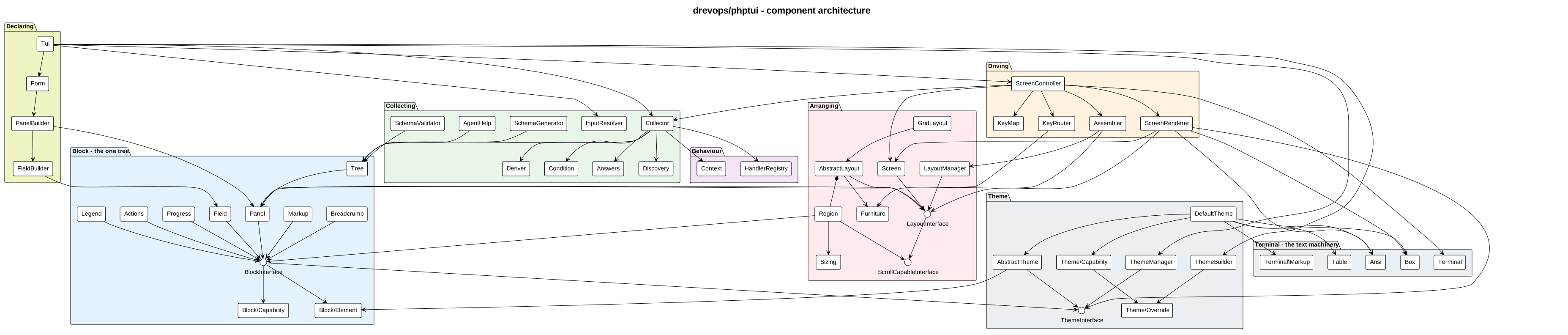
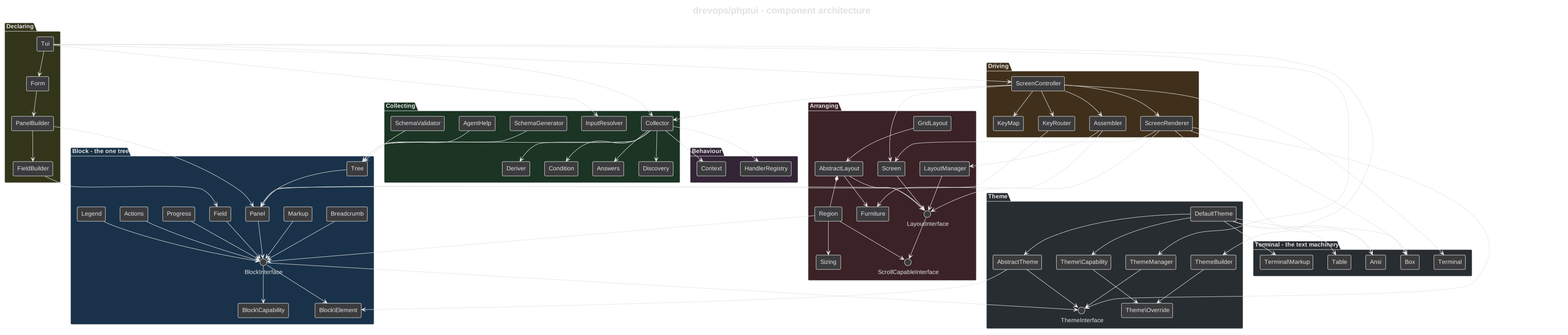
Read it as three concerns around that tree:
- Declaring.
Form,PanelBuilderandFieldBuilderwrite the tree;Tuiis the facade you hold. Everything that describes the terminal rather than the questionnaire - the theme, the layout, the key bindings, color, Unicode, the footer - is set on the facade, so one declaration serves every way of running it. - The tree itself.
Panel,Field,Markup,Breadcrumb,Legend,ActionsandProgressall implementBlockInterface. Each declares what it can do as a capability interface and what it needs drawn as an elements interface. - Running it.
Collectorcollects the tree with no screen at all.ScreenControllerdrives it through a terminal - arranging it with aScreen, a layout and its regions, sending each key inward withKeyRouter, drawing outward withScreenRenderer. Both paths settle the same rules and produce the sameAnswers.
Under all three sits the terminal. Terminal is the device - raw mode, the alternate screen, the size it reports - and beside it is the text machinery every drawn line passes through: Ansi for escape sequences, Box and Table for the geometry of a frame and a grid, and Terminal\Markup - distinct from the Markup block above - for the markdown subset. All of it takes plain strings and hands plain strings back, so nothing above it has to know how a glyph reaches the screen.
Text you supply is filtered at the door
A terminal acts on some bytes rather than printing them, so a label, a markup body or a collected answer containing ESC[2J would clear the screen instead of reading as text. Ansi::sanitize() filters every string you hand the library, at the point it is taken in: a block setter, a value the collection resolves, a save from your $EDITOR, a key you type. Escapes are removed. Newline and tab are kept, and CRLF or a lone CR folds to a newline, so multi-line content keeps its lines.
A block therefore never holds a byte a terminal would act on, and that applies to your own theme too - an element only ever receives filtered text. The library's own escapes are unaffected, because the theme composes styling after the filter runs, so a form built from untrusted content keeps its color.
Identifiers are excluded: field, panel and markup ids, action names, and the keys of a collected answer address something rather than being read, and the library never draws one. Pick them yourself rather than from untrusted input.
Step 1 - describe the questions
You declare the questions in PHP with the fluent Form builder: panels holding fields. A field has an id, a type (text, select, suggest, search, filepicker, confirm and the rest; select, search and filepicker collect a list with ->multiple()) and optional rules - default, required, options, when (show it only when a condition holds), derive (compute it from other fields) and discover (detect it from the target directory).
What the builder produces is not a separate model: it writes the block tree directly. $form->root() hands back the root Panel, its regions hold the blocks, and a sub-panel is a block in a region like any other. There is one tree, and every call on the facade reads that one - collect(), interact(), schema(), validate(), agentHelp().
The declaration is checked as it is written. Anything a single call can decide throws at that call - an unknown layout name, a setter on a kind that has nothing to set it on - and anything only the finished tree can decide throws when the form is built: duplicate field ids, an unknown transform name, a modal declaring sub-panels. Either way it is caught before a session starts rather than mid-session. Nothing runs yet; this is pure description.
Step 2 - attach behavior where you need it
Most fields need no code at all. When one does - a dynamic default, discovery, validation or a normalization - declare it on the field itself: ->default(fn ...), ->validate(fn ...), ->transform(fn ...), ->discover(...). Reusable validators and transformers are public static methods on a class named after the field id (red_apple -> RedApple) in a registered namespace - reference them explicitly as first-class callables, or let the HandlerRegistry resolve them as the fallback. When both exist, the field declaration wins.
Step 3 - collect the answers
Tui::collect() turns the tree plus whatever you supplied into a settled set of answers, with no screen anywhere:
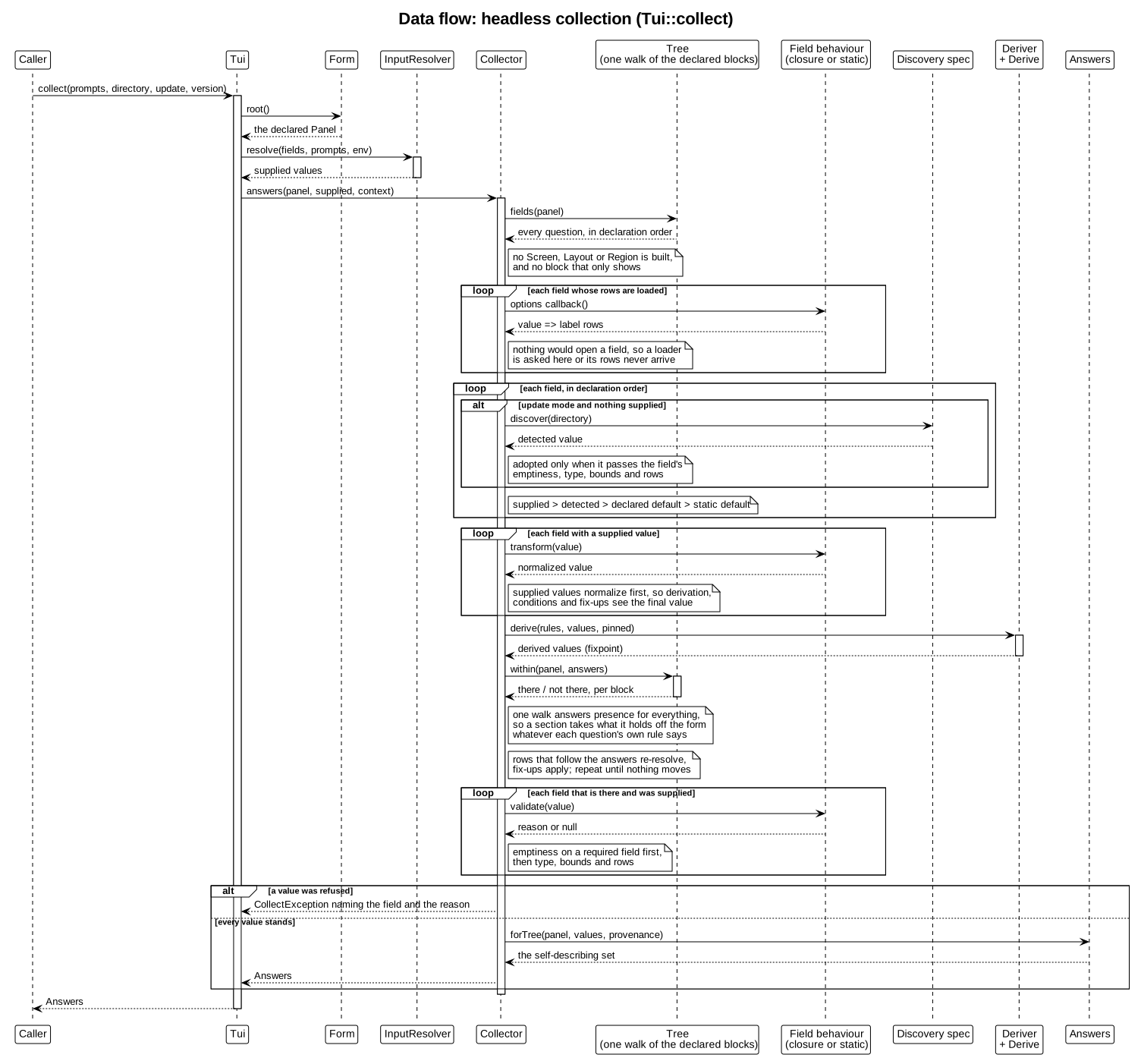
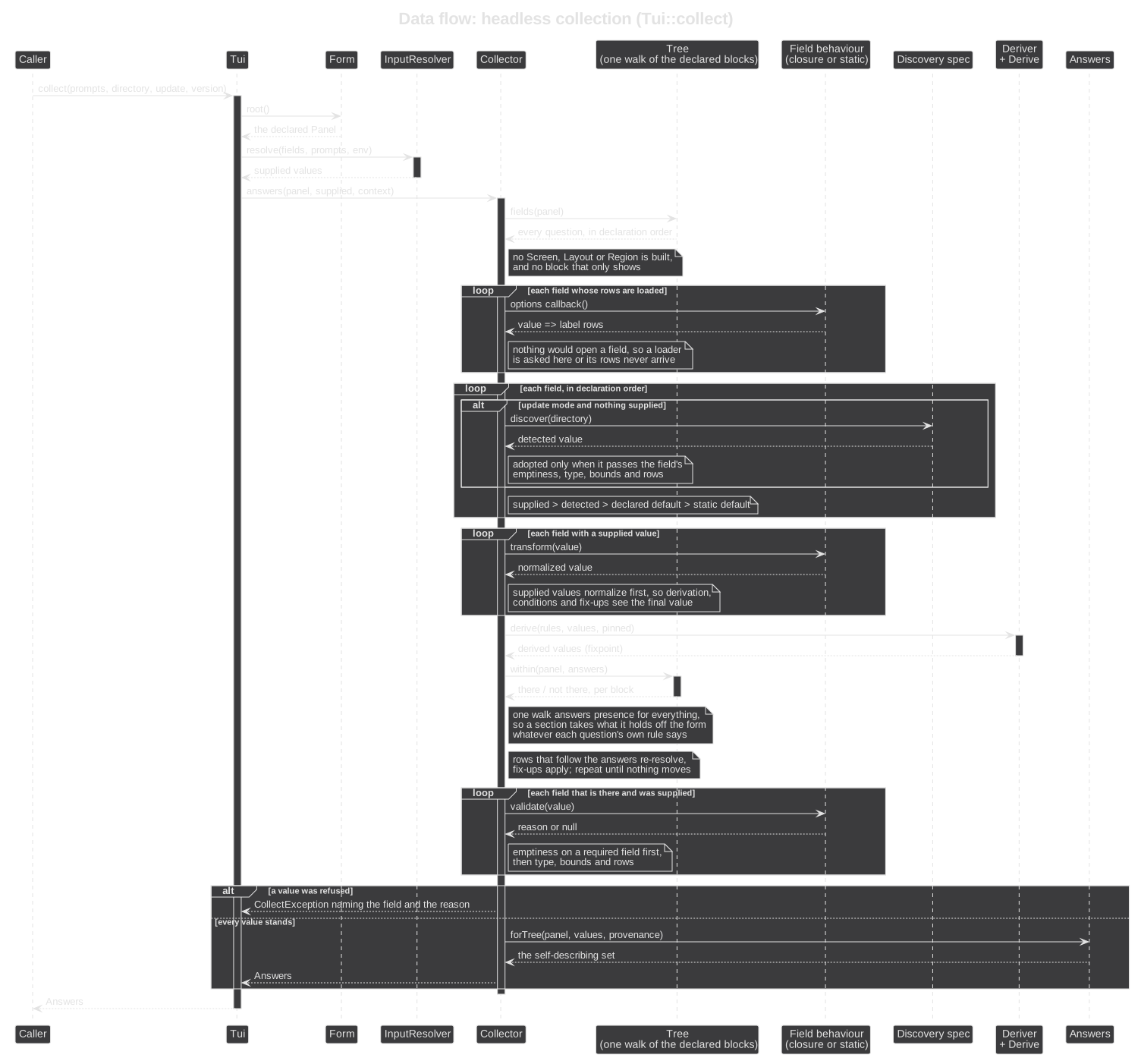
Four capabilities survive here and thirteen do not, and the line between them is the useful part: collecting, constraining, refusing and depending on another answer are the form's meaning; the rest is how it looks. No Screen, no layout and no Region is built, and neither is any block that only shows.
Walking the sequence:
- Resolve each field's starting value, in priority order: an explicit input (from a JSON payload or the environment, through
InputResolver) beats a discovered value (in update mode, adopted only when it passes the field's emptiness, type, bounds and rows), which beats a dynamic default, which beats the static one. - Normalize each supplied value through its declared or resolved transform, so derivation, conditions and fix-ups all see the final value. Defaults and derived values are the form's own and skip the transformers.
- Settle.
Deriverrecomputesderivevalues until they stop changing, theConditionrules decide which fields are there at all, option lists that follow the answers re-resolve, and fix-ups reconcile dependents - repeated until nothing moves. - Measure each supplied value that survived: emptiness on a required field first, then type, bounds and rows. A value the form refuses raises
CollectExceptionnaming the field and the reason, because with no screen there is nobody to retype it. - Emit
Answers- the values plus their provenance (default, detected, edited, derived, override).
Only supplied values are measured, and only once the set has settled, because until then there is nothing final to measure them against.
Step 4 - let a person answer (optional)
For interactive use, ScreenController::run() seeds itself from the same collector and drives a terminal session until the form ends:
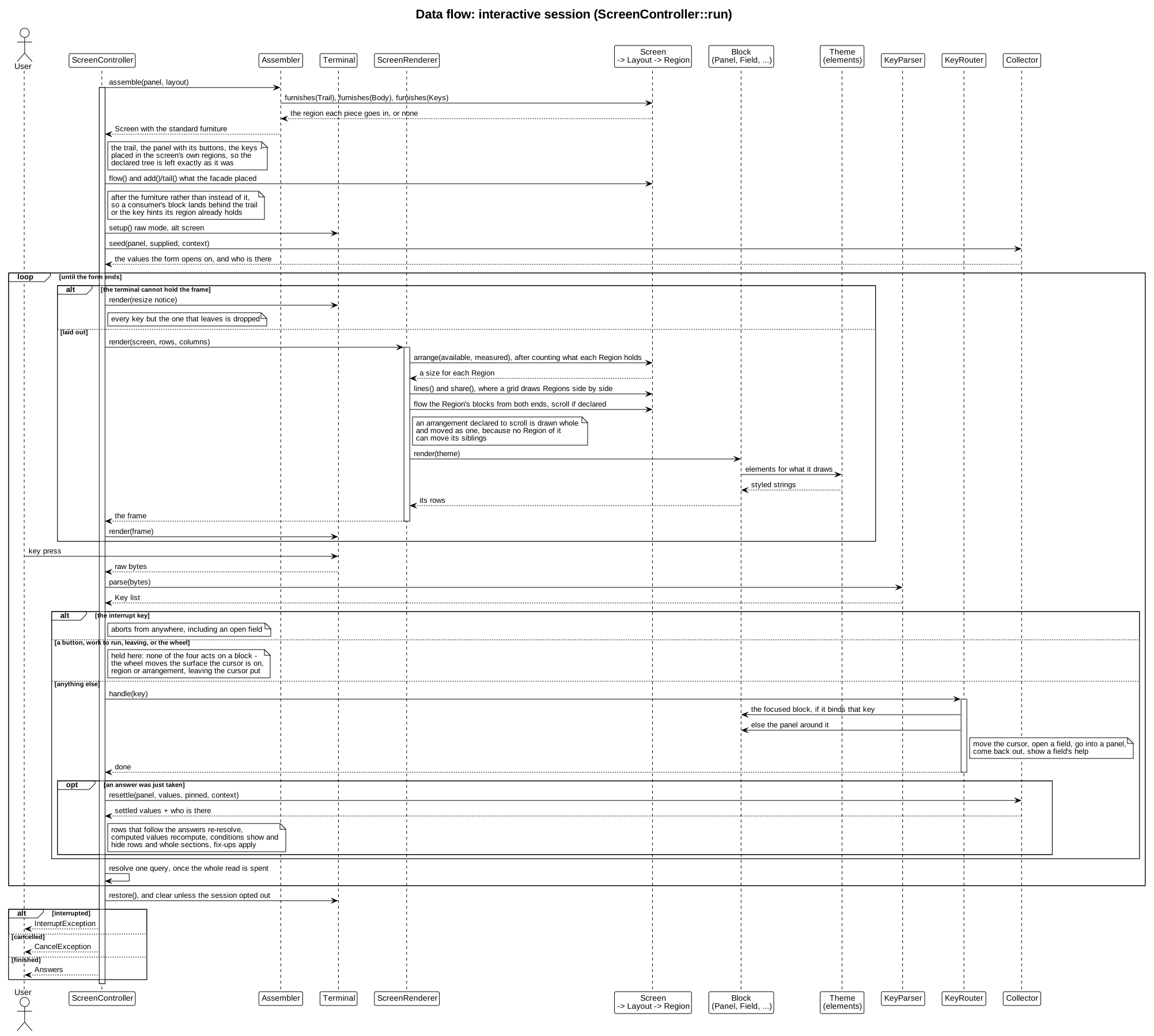
Assembling. Assembler builds a Screen around the panel and asks the layout, one Furniture role at a time, which of its regions each piece belongs in: the trail, the form itself with its Actions, and the keys. AbstractLayout answers with the conventional header, content and footer, so a layout using those names is furnished without writing a line, and one calling its regions something else overrides furnishes() and says where each piece goes. A piece it answers NULL for is never drawn; only the form itself has to be answered, and a layout with nowhere for it is refused where it is named. Everything placed goes into the screen's own regions, so after a session the declared tree holds exactly what the form declared. The layout comes from LayoutManager: a shipped name, a name you registered, or the class itself. See Layouts.
Drawing runs outward. The Screen gives its layout the terminal; the renderer counts what each region holds and hands the layout the numbers; the layout takes the sized regions off the top - the fixed ones and the measured ones alike - and divides the remainder by the declared shares; each Region flows its blocks and scrolls them if it was declared to, and an arrangement declared to scroll moves every line of itself at once; each block's render() reaches the theme for elements; the theme returns styled strings. Every step hands down exactly one thing and knows nothing of the step after it, and nothing reaches back up.
Keys run inward. KeyParser turns raw bytes into Key objects and a KeyMap resolves each to a semantic action rather than a fixed key - configurable per field type, shipping a vim preset beside the default, validated when ->keys() is called. KeyRouter then sends the key to the innermost thing that binds it: the focused block if it binds that key, else the panel around it. That is why an open text field swallows ? as a character while a closed one lets it travel outward and open help.
Four kinds of key never reach the router, and all four for the same reason - none of them acts on a block. Pressing a button ends the form or closes the dialog it belongs to; activating a progress row runs its work against the terminal a step at a time, repainting between steps; leaving is about the session rather than about anything in it; and the wheel moves the surface the cursor is on - the Region it is in, or the arrangement itself where that is what moves as one - which is not a block at all. A block never learns where it is drawn, so whoever owns the terminal holds these.
Every answer re-settles the form. An accepted edit goes back through the collector: derive rules recompute, when conditions show and hide rows, answer-driven option lists re-resolve and fix-ups re-apply - so the session honors exactly what a headless collection would.
The frame. Border, spacing, alignment and the min/max sizes are theme options. In fullscreen the frame stretches to the terminal and the content anchors at halign/valign; below the minimum size a resize notice takes the frame's place and every key but the one that leaves is dropped. A panel declared ->modal() is drawn as a centered dialog over the dimmed screen behind it, with its own submit/cancel pair - submit keeps the edits, cancel restores the answers the dialog opened with.
How it ends is the whole of what a caller sees. Finishing hands back Answers; abandoning through the cancel button raises CancelException; Ctrl-C raises InterruptException from anywhere, including from inside an open field. Partial answers are never mistaken for a completed form.
Step 5 - apply the answers (the consumer's job)
Collecting produces answers; acting on them - writing files, renaming directories - is your job, never the library's. A consumer that processes answers defines its own processor contract with a process() hook, resolves each processor class by field id through the HandlerRegistry, and sequences the work by its own rules - ordering is a processing concern the form declaration does not carry. One class per field can carry both its process() and the reusable static validate()/transform() the collector resolves.